.webp?width=1153&height=571&name=Cloud9-Blue_Only-2%20Cloud%209%20Logo%20(1).webp "Cloud9-Blue_email3.png")

ERP implementation can feel like the hardest part of moving to a new system, especially when teams are used to the way things have always been done.
But with the right planning and support, the process becomes much more manageable. For businesses considering Acumatica or replacing Dynamics GP, Cloud 9 ERP Solutions helps turn a major system change into a more organized, practical transition.
Common ERP Implementation Challenges to Avoid
Most ERP implementation challenges can be reduced with proper planning. Before beginning the process, it helps to understand where projects often get off track.
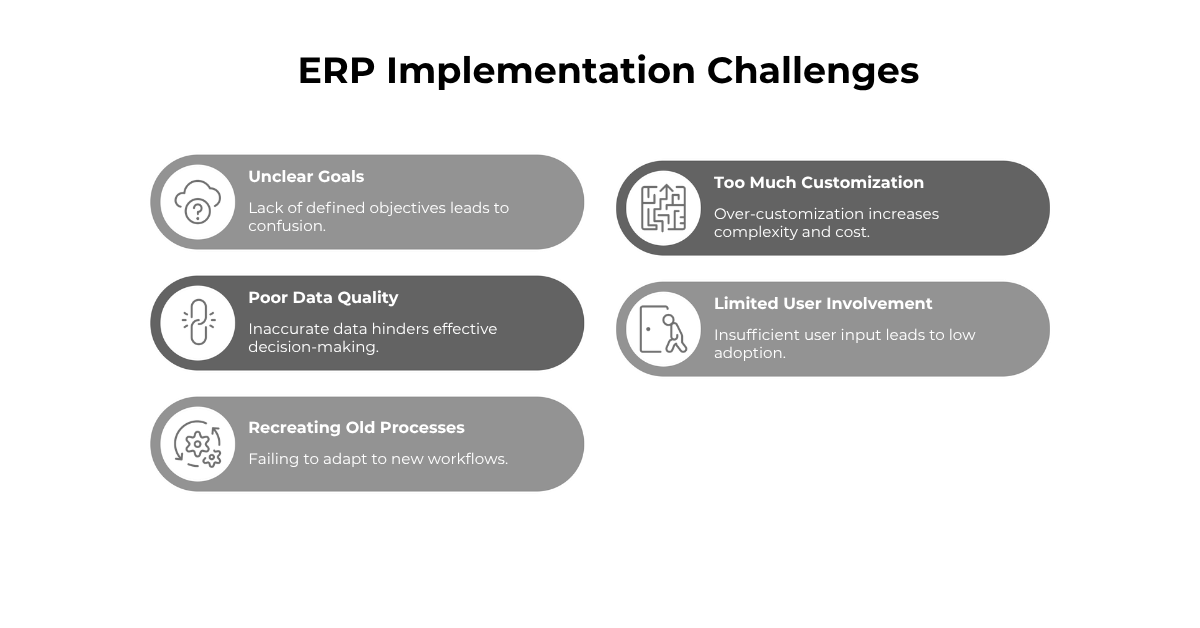
Unclear goals and requirements: If the business does not define what the new ERP system needs to accomplish, decisions become harder later. Clear goals around reporting, workflows, integrations, data, and user needs help keep the project focused.
Poor data quality: Legacy systems often contain duplicate, outdated, or inconsistent data. For businesses moving from Dynamics GP, data cleanup should begin early so the new cloud ERP system starts with accurate information.
Recreating old processes: A new ERP system should not simply copy every workaround from the old system. Implementation is an opportunity to improve processes, reduce manual work, and build a better foundation for the business.
Too much customization: Customization can be useful, but too much can add cost, complexity, and testing time. An experienced Acumatica partner can help determine when standard functionality, configuration, integrations, or custom development makes the most sense.
Limited user involvement: ERP affects the entire business, not just IT. End users and department leaders should be involved in discovery, testing, and training so the system reflects how work actually gets done.
ERP Implementation Is a Business Improvement Project
An ERP implementation is not just a software project. It affects how people enter information, manage approvals, access reports, track inventory, serve customers, monitor projects, and make decisions.
For businesses still using Dynamics GP, the need to plan ahead is becoming more urgent as GP moves toward its sunset. A Dynamics GP migration gives organizations a path away from an aging legacy system and toward modern business management software that is better equipped to support current operations and future growth.
What Are the Main Phases of a Successful ERP Implementation?
Every ERP implementation is different, but most successful projects follow a structured process. The timeline depends on the size of the business, complexity of operations, data migration needs, reporting requirements, integrations, and number of users.
A successful Acumatica implementation typically includes the following:
Phase 1: Discovery and Planning
Discovery gives the project team a clear starting point. Before configuring the ERP system, the implementation team needs to understand how the business operates today. This includes current processes, pain points, reporting needs, approval workflows, department responsibilities, integrations, and system limitations.
For businesses moving from Dynamics GP, discovery may include reviewing current GP modules, third-party applications, financial reporting requirements, chart of accounts structure, historical data needs, and other processes. This phase should also define what success looks like.
Cloud 9 ERP Solutions’ Acumatica consultants use discovery to help businesses clarify priorities before configuration begins.
Phase 2: Internal Team Alignment
ERP implementation requires participation from the business. A strong internal project team usually includes leaders and subject matter experts from finance, operations, purchasing, inventory, sales, customer service, project management, IT, and executive leadership.
For Dynamics GP migration projects, it is especially helpful to involve people who understand how GP is used day to day. They can identify critical processes, key reports, and legacy workarounds that may need to be addressed.
This internal alignment helps the project team make better decisions, test more accurately, and support adoption across the organization.
Phase 3: Process Review and System Design
Once the goals are clear, the team can review current processes and design how the new system should support the business.
This phase looks at questions like:
-
Where is duplicate data entry happening?
-
Which approvals are still manual?
-
What reports take too long to prepare?
-
Where does the business lack real-time visibility?
-
What can be simplified or automated?
For companies replacing Dynamics GP, this is one of the most valuable parts of the project. Instead of rebuilding every legacy process, the business can decide what should stay, what should change, and what can be improved through cloud ERP.
After requirements are reviewed, the ERP system can be configured. For an Acumatica implementation, this may include users, roles, permissions, workflows, dashboards, financial structures, inventory settings, purchasing processes, sales order processes, and reporting tools.
Cloud 9 ERP helps businesses make practical configuration decisions that support daily operations without adding unnecessary complexity.
Phase 4: Data Migration, Integrations, and Reporting
Data migration should be planned early. Moving information from a legacy system into a new ERP platform requires reviewing, cleaning, mapping, testing, and validating the data. For a Dynamics GP migration, this may include customer records, vendor records, item data, open invoices, purchase orders, general ledger balances, chart of accounts, historical financial data, and reporting data.
Not all historical data needs to move into the new ERP system. Some businesses migrate active records and key history while keeping older GP data available in an archive. The right approach depends on reporting needs, compliance requirements, data quality, and how often historical information is used.
This phase should also address integrations and reporting. Businesses often need the ERP system to connect with payroll, CRM, ecommerce, banking, shipping, expense management, or other business tools.
Reporting is often a major reason companies move to modern cloud ERP software. Cloud 9 ERP Solutions helps businesses define the dashboards, reports, and metrics they need so teams can access better information after go-live.
Phase 5: Testing and Validation
Testing the ERP system gives the team time to catch issues before the business depends on it. Users should test real business scenarios, including sales orders, purchase orders, invoices, approvals, inventory transactions, financial reports, integrations, and user permissions.
For Dynamics GP replacement projects, validation is especially important. The team should compare key information between GP and the new system, including financial balances, open transactions, and critical reports.
Testing can take time, but it helps reduce risk. Issues found during testing are easier to correct than issues discovered after go-live.
Phase 6: Training and Go-Live Preparation
Training helps users understand how to complete their work in the new ERP system. Effective training should be practical and role-based. Finance users, warehouse teams, executives, project managers, and customer service employees do not all need the same training. Each group needs to understand how the system supports their responsibilities.
Go-live preparation should confirm that configuration is complete, data has been validated, users have been trained, reports have been reviewed, integrations have been tested, and support plans are in place.
Some businesses go live all at once. Others use a phased approach by department, location, module, or business function. Cloud 9 ERP Solutions helps businesses choose a go-live plan that fits their operations, readiness, and risk tolerance.
Phase 7: Post-Go-Live Support and Optimization
After ERP implementation, once users begin working in the new system, questions will come up. Some workflows may need refinement, and reports may need adjustment.
Post-go-live support helps stabilize the system and gives the business time to improve how it is being used. Cloud 9 ERP Solutions continues supporting businesses after launch so the ERP system can keep delivering value as the organization evolves.
Why the Right Acumatica Partner Matters
An experienced Acumatica partner brings structure to the process. They help define requirements, identify risks, support data migration, configure the system, guide testing, train users, and provide support after launch.
As a Gold Certified Acumatica Partner, Cloud 9 ERP Solutions helps businesses approach Acumatica implementation with a clear plan and a focus on practical business outcomes.
Schedule a consultation with Cloud 9 ERP Solutions to start planning your move from Dynamics GP.
FAQ: ERP Implementation Process
What is the ERP implementation process?
The ERP implementation process is the structured approach a business follows to plan, configure, test, launch, and support a new ERP system. It typically includes discovery, process review, data migration, configuration, testing, training, go-live, and post-launch support.
What are the most common ERP implementation challenges?
Common ERP implementation challenges include unclear goals, poor data quality, limited user involvement, too much customization, rushed testing, and insufficient training. These challenges can often be reduced with proper planning and an experienced implementation partner.
How long does an Acumatica implementation take?
The timeline for an Acumatica implementation depends on the size of the business, number of users, complexity of processes, data migration needs, integrations, and reporting requirements.
How does Dynamics GP migration affect ERP implementation?
Dynamics GP migration adds important considerations around data cleanup, historical reporting, third-party integrations, chart of accounts structure, user training, and validation between GP and the new cloud ERP system.
Do businesses need to move all historical data from Dynamics GP?
Not always. Some businesses migrate active records and key history while keeping older GP data in an archive. The right approach depends on reporting needs, compliance requirements, data quality, and how often the business uses historical information.
Why work with Cloud 9 for Acumatica implementation?
Cloud 9 ERP Solutions helps businesses plan and manage Acumatica implementation projects from discovery through post-go-live support. Cloud 9’s Acumatica consultants assist with requirements, configuration, data migration, integrations, reporting, testing, training, and long-term optimization.


%20(1)-1.png)